

Record a cash, check or card payment
Record money that arrived outside Ormi, in full or in part, take a card from the office, or record cash and checks in the field.
On this page
Before you start
- The invoice has been sent. Drafts cannot take a payment.
- In the office: your role can record payments. Admin, Office Manager and Dispatcher can by default.
Which way to use
- Money already in hand at the office (cash, a check, or another way): Record payment in the web app. Part payments are fine.
- A technician collecting cash or a check on site: record it in the Ormi Field app.
- Charging a card or bank account over the phone or at the counter: Collect Payment.
Record a payment (web)
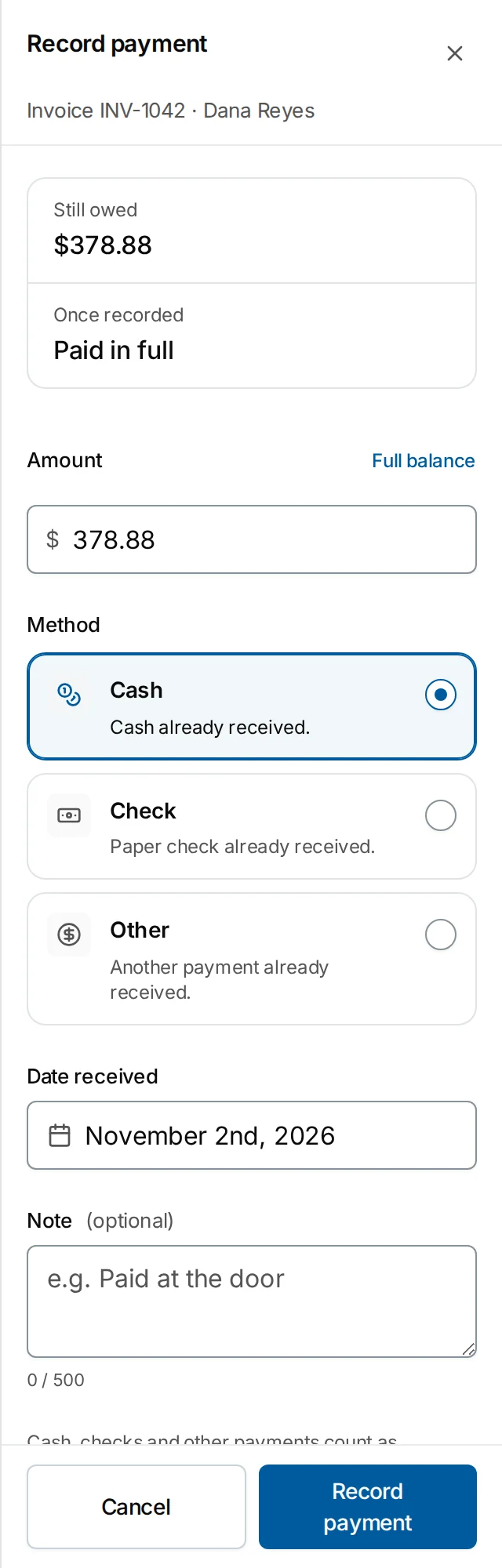
- Open the invoice and click Record payment, or choose Record payment from the invoice's row menu on Invoices.
- Check the Amount. It starts at the full balance; type less for a part payment. Once recorded shows the remaining balance or Paid in full.
- Choose the Method: Cash, Check or Other. For a check, enter the Check number.
- Set Date received if the money arrived on an earlier day. It cannot be a future day.
- Optional: add a Note, then click Record payment.
Record cash or a check in the field
- On the job in the Ormi app, open Collect Payment.
- Choose Cash or Check and enter the amount. A check needs the Check number.
- Save. Cash and check payments count as received straight away, and they are saved even without a signal.
Take a card from the office (web)
- On the invoice, click Collect Payment.
- Check the Customer and Amount (any amount from $0.50, so part payments work).
- Use a saved card, Use new card and type the Card Details, or Express checkout for Apple Pay or Google Pay.
- Optional: tick Email receipt to customer, then click Process Payment.
What if this fails?
- "Amount can't be more than the ... still owed".
- A payment cannot exceed the invoice balance. Record the balance, and handle any overpayment with the customer.
- I don't see Record payment.
- It shows only on sent invoices that still owe money, and only to roles that can record payments. Ask an admin.
- Collect Payment is greyed out with "Payment setup is required first".
- Card payments need Stripe. Finish Connect payments. Cash and checks can be recorded without it.
- I recorded a payment on the wrong invoice.
- Refund it from the invoice's Payments tab (for cash or a check Ormi only records the refund), then record it on the right invoice. See Refund a payment.
Was this article helpful?
Feedback helps improve this guide. For help with your account,contact support.
Still stuck?
Already using Ormi? Open Help and support (the ? at the top of the office app) to message our team with your account attached. Or reach us directly: